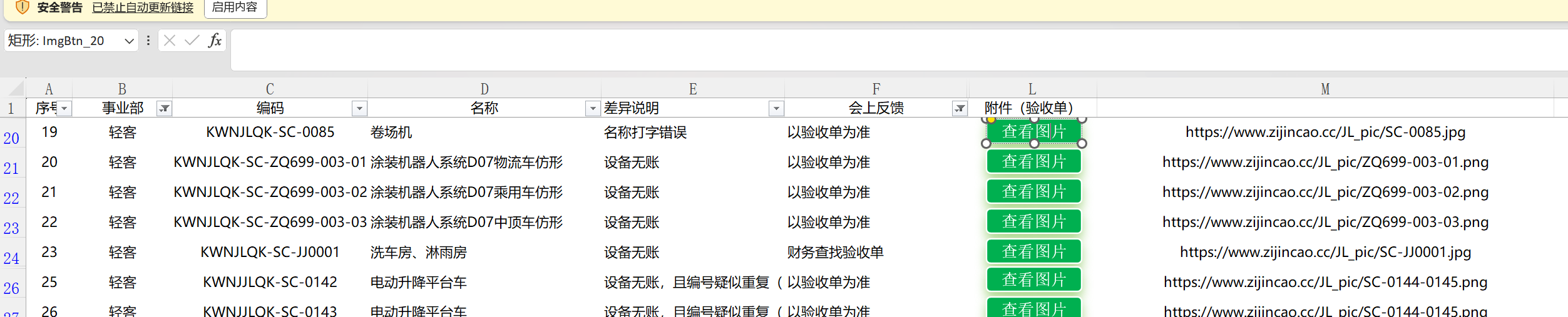
表格中实现点击按钮,跳转到浏览器打开图片
效果:
' === 最终优化版:Office + WPS 通用 + 几乎秒开图片 ===

Public Sub OpenImageByButtonName()
    Dim btnName As String
    Dim row As Long
    Dim url As String

    ' 获取按钮名称
    btnName = Application.Caller

    If btnName = "" Then
        MsgBox "无法获取按钮名称,请确保已正确分配宏", vbExclamation
        Exit Sub
    End If

    ' 提取行号(支持 查看图片_5、Pic_18 等格式)
    Dim underscorePos As Integer
    underscorePos = InStrRev(btnName, "_")

    If underscorePos = 0 Then
        MsgBox "按钮名称格式错误:需以 _行号 结尾" & vbCrLf & "当前:" & btnName, vbExclamation
        Exit Sub
    End If

    If Not IsNumeric(Mid(btnName, underscorePos + 1)) Then
        MsgBox "行号无效:" & btnName, vbExclamation
        Exit Sub
    End If

    row = CLng(Mid(btnName, underscorePos + 1))

    ' 读取M列URL并清理
    url = Trim(Me.Cells(row, 13).Value)

    If url = "" Then
        MsgBox "第 " & row & " 行 M列未填写图片URL", vbExclamation
        Exit Sub
    End If

    ' === 自动修复常见URL错误 ===
    url = Replace(url, " ", "")                     ' 去空格
    If Left(url, 8) = "https//" Then url = "https://" & Mid(url, 9)
    If Left(url, 7) = "http//" Then url = "http://" & Mid(url, 8)
    If Left(LCase(url), 4) <> "http" Then url = "https://" & url  ' 默认加https

    ' === 直接打开网络图片(Office & WPS 通用,速度极快)===
    On Error GoTo OpenError
    ThisWorkbook.FollowHyperlink url, NewWindow:=True
    Exit Sub

OpenError:
    MsgBox "无法打开图片,请检查URL是否正确:" & vbCrLf & url, vbCritical
End Sub
ps:ai写的,可直接用(M列放链接,插入的形状名称改成包含当前行,具体看效果图)