
如何在宝塔面板上部署strapi
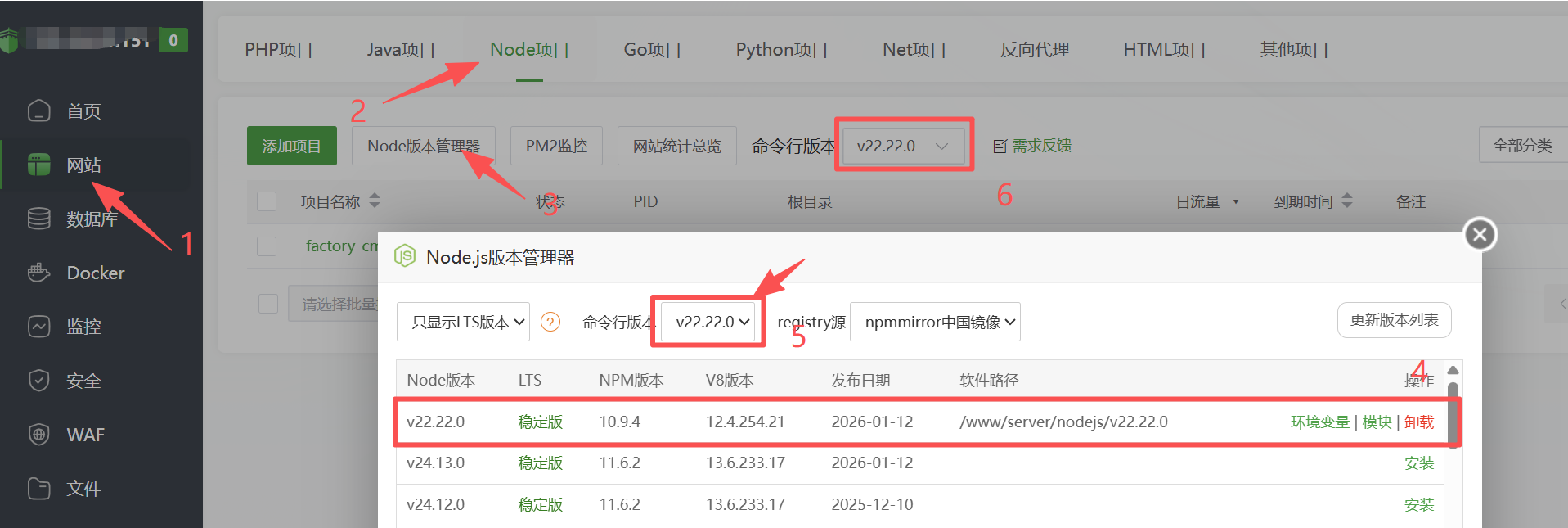
1.安装node.js ,我这里安装的是v22.22.0版本
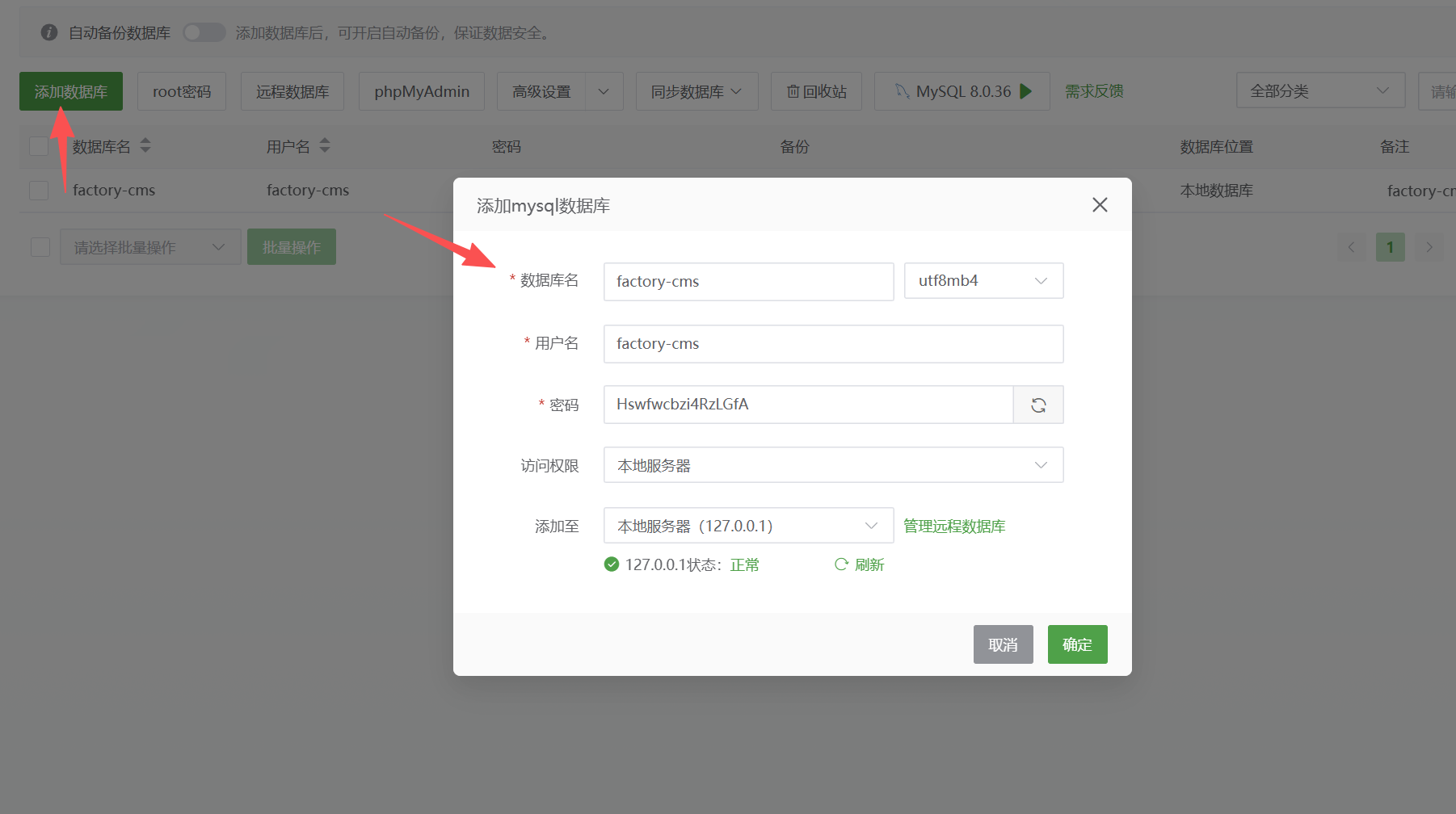
2.创建数据库
3. 点击宝塔面板里的终端执行以下命令
//进入wwwroot文件夹
cd /www/wwwroot
//测试npm是否安装成功,如果出现版本号就说明npm安装没问题
npm -v
//执行安装命令,factory-cms为自定义的项目文件夹名称
npm create strapi@latest factory-cms
后面的内容看我下面的执行过程记录,按照我下面的执行完成之后,进行如下操作
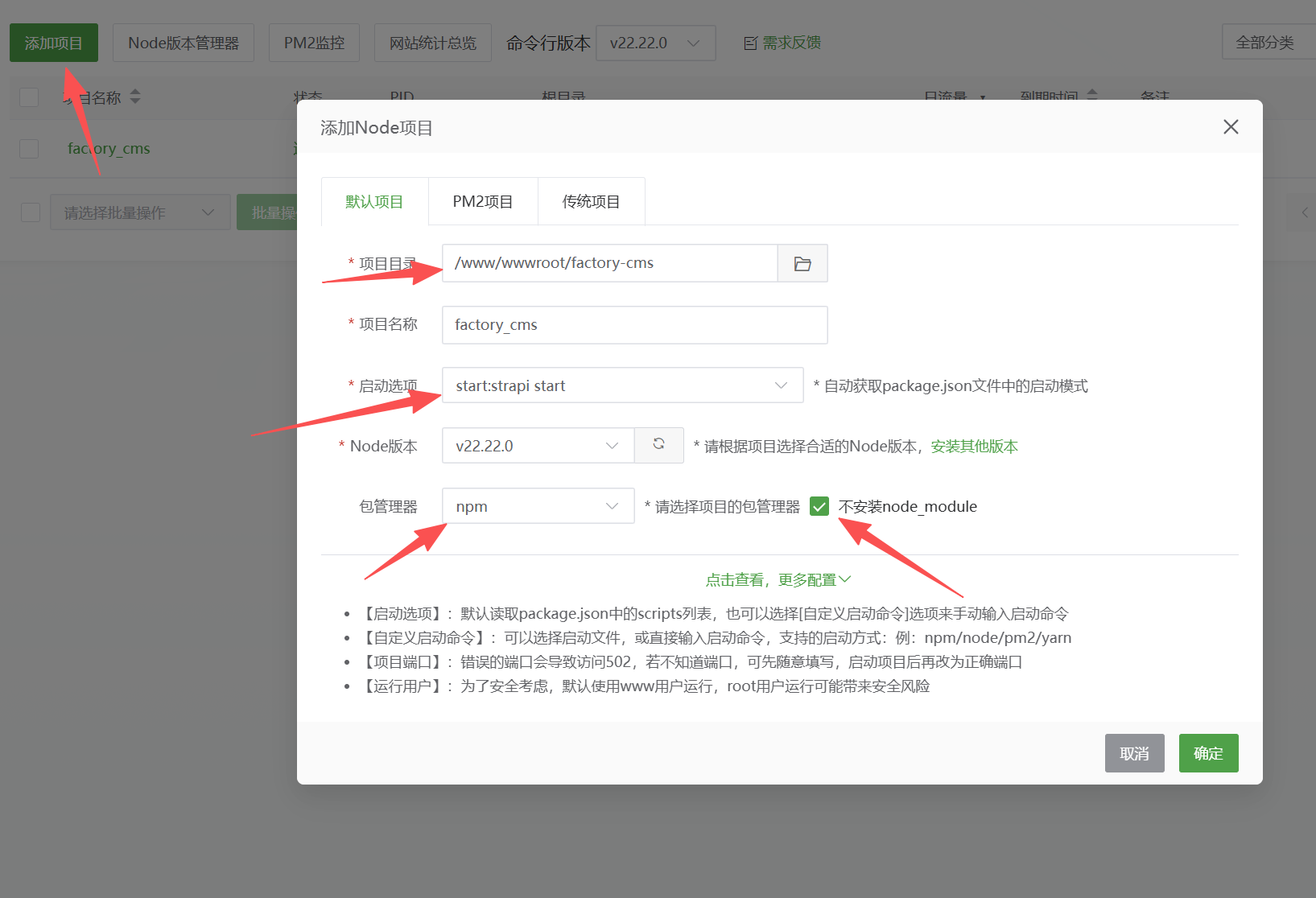
1.在Node项目里面添加Node项目,如图所示,添加完成一定要重启。
2.浏览器打开 http://你的服务器IP:1337 设置管理员,并进入后台。(如果网站打不开,1.看有无重启 2.看有无打开1337服务器防火墙端口 3.宝塔面板里有无放行1337端口)
3.进入后台之后,你会发现无法添加集合元素,并伴有弹窗需要打开开发模式才能编辑等等。此时是因为我们前文的启动选项为start:strapi start此时代表是生产模式,所以某些地方无法编辑。解决方法:进入刚刚的Node项目,停止当前项目,然后把启动选项设置为develop:strapi develop 开发模式,启动项目,重启当前项目,此时后台就可以编辑了。
编辑完成再改为生产模式,生产模式访问比开发模式快。
4.汉化操作:
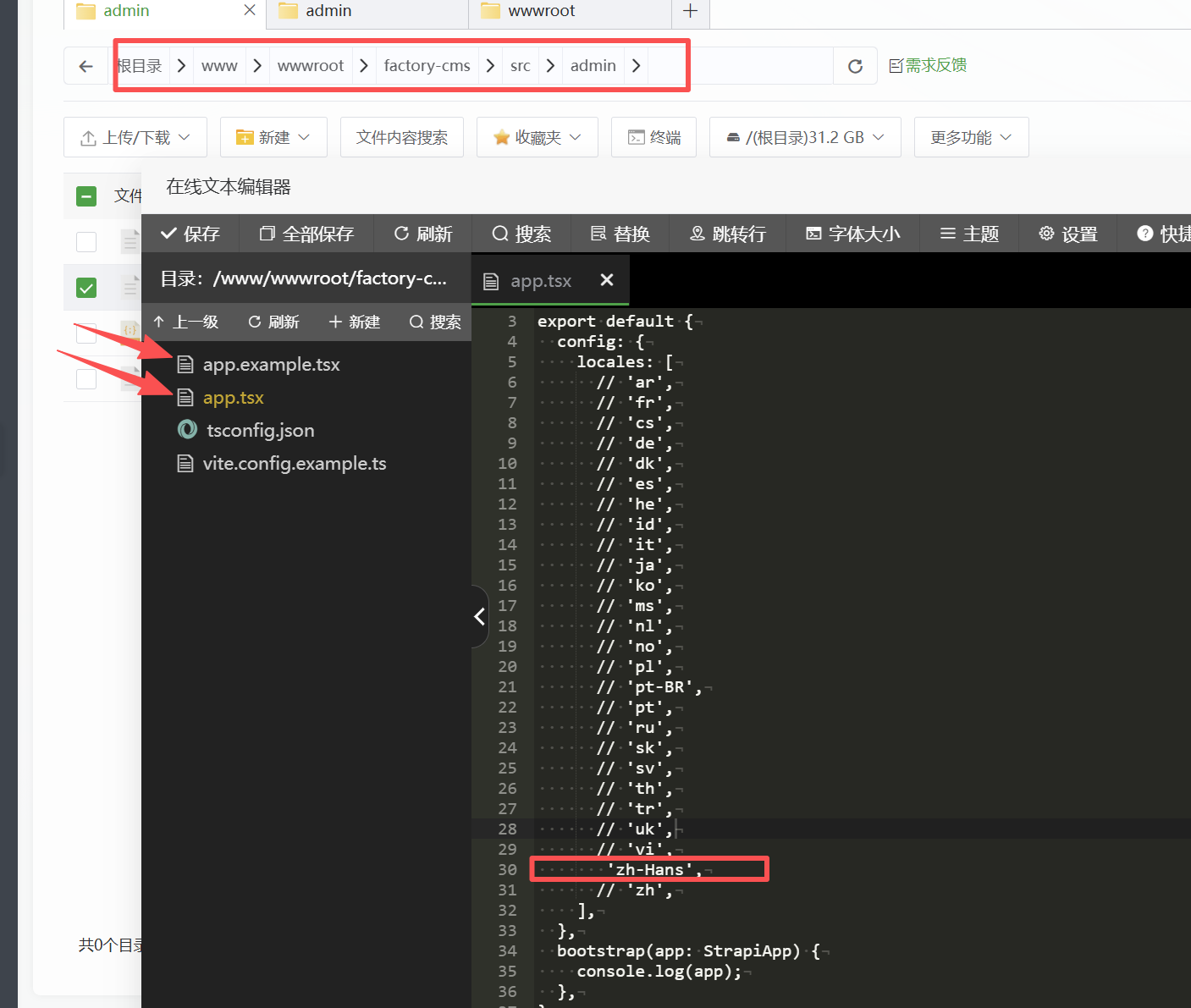
4.1进入/www/wwwroot/factory-cms/src/admin文件夹,把app.example.tsx文件复制 粘贴为app.tsx,打开app.tsx, 如图所示把 'zh-Hans',前方的//取消掉。 保存,重启 。
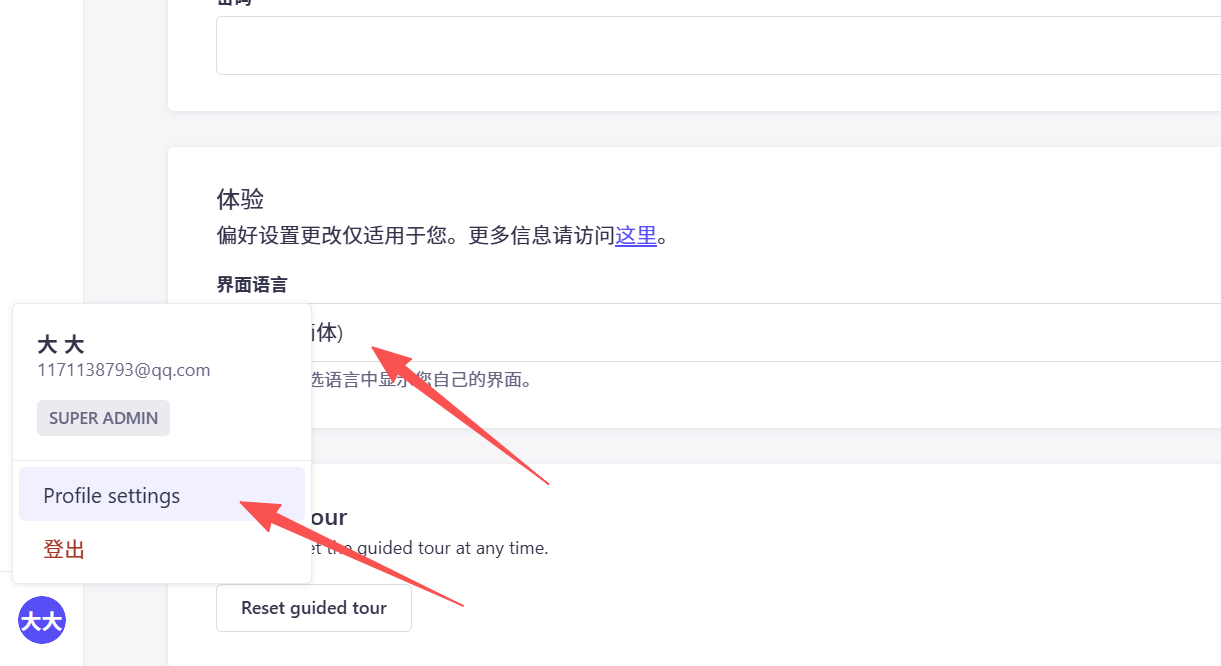
4.2
如图所示,进入后台修改语言
[root@VM-0-14-opencloudos ~]# cd /www/wwwroot
[root@VM-0-14-opencloudos wwwroot]# npm -v
10.9.4
[root@VM-0-14-opencloudos wwwroot]# npm create strapi@latest factory-cms
Need to install the following packages:
create-strapi@5.34.0
Ok to proceed? (y) y


> npx
> create-strapi factory-cms


 Strapi   v5.34.0  Let's create your new project


 Welcome to Strapi! Ready to bring your project to life?

Create a free account and get:
30 days of access to the Growth plan, which includes:
 Strapi AI: content-type builder, media library and translations
 √ Live Preview
 √ Single Sign-On (SSO) login
 √ Content History
 √ Releases

? Please log in or sign up. Skip
? Do you want to use the default database (sqlite) ? No
? Choose your default database client mysql
? Database name: factory-cms
? Host: 127.0.0.1
? Port: 3306
? Username: factory-cms
? Password: ****************
? Enable SSL connection: No
? Start with an example structure & data? No
? Start with Typescript? Yes
? Install dependencies with npm? Yes
? Initialize a git repository? No
? Participate in anonymous A/B testing (to improve Strapi)? No

 Strapi   Creating a new application at /www/wwwroot/factory-cms

   deps   Installing dependencies with npm
npm warn deprecated inflight@1.0.6: This module is not supported, and leaks memory. Do not use it. Check out lru-cache if you want a good and tested way to coalesce async requests by a key value, which is much more comprehensive and powerful.
npm warn deprecated mailcomposer@3.12.0: This project is unmaintained
npm warn deprecated buildmail@3.10.0: This project is unmaintained
npm warn deprecated keygrip@1.1.0: Package no longer supported. Contact Support at https://www.npmjs.com/support for more info.
npm warn deprecated boolean@3.2.0: Package no longer supported. Contact Support at https://www.npmjs.com/support for more info.
npm warn deprecated glob@7.2.3: Glob versions prior to v9 are no longer supported
npm warn deprecated rimraf@3.0.2: Rimraf versions prior to v4 are no longer supported
npm warn deprecated glob@7.2.3: Glob versions prior to v9 are no longer supported
npm warn deprecated glob@10.5.0: Old versions of glob are not supported, and contain widely publicized security vulnerabilities, which have been fixed in the current version. Please update. Support for old versions may be purchased (at exorbitant rates) by contacting i@izs.me
npm warn deprecated glob@7.2.3: Glob versions prior to v9 are no longer supported
npm warn deprecated glob@7.2.3: Glob versions prior to v9 are no longer supported

added 1454 packages in 2m

266 packages are looking for funding
  run `npm fund` for details

       ✓  Dependencies installed

 Strapi   Your application was created!
          Available commands in your project:

          Start Strapi in watch mode. (Changes in Strapi project files will trigger a server restart)
          npm run develop

          Start Strapi without watch mode.
          npm run start

          Build Strapi admin panel.
          npm run build

          Deploy Strapi project.
          npm run deploy

          Display all available commands.
          npm run strapi

          To get started run

          cd /www/wwwroot/factory-cms
          npm run develop
[root@VM-0-14-opencloudos wwwroot]# cd /www/wwwroot/factory-cms
[root@VM-0-14-opencloudos factory-cms]# npm run build

> factory-cms@0.1.0 build
> strapi build

✔ Compiling TS (2121ms)
⠋ Building build context
[INFO] Including the following ENV variables as part of the JS bundle:
    - ADMIN_PATH
    - STRAPI_ADMIN_BACKEND_URL
    - STRAPI_TELEMETRY_DISABLED
    - STRAPI_AI_URL
    - STRAPI_ANALYTICS_URL
✔ Building build context (160ms)
⠋ Building admin panel
✔ Building admin panel (37420ms)
[root@VM-0-14-opencloudos factory-cms]# chown -R www:www /www/wwwroot/factory-cms
[root@VM-0-14-opencloudos factory-cms]#